
Overview
Learners can record an Actual Learning Activity start date and time within a pending assessment. This allows Off-the-Job (OTJ) learning to be accurately logged and submitted as part of the assessment process.
User Roles
This process can be completed by:
- Learners
Steps to Record an Actual Learning Activity Start Date
- Navigate to the Learner Portfolio.
- Click Assessments.
- Select the relevant Assessment.
- Scroll down to the Timesheet section.
- Select the Start Date.
- Select the Start Time.
- Tick Off-the-job if the activity meets OTJ criteria.
Once the assessment has been signed, the recorded learning activity will count towards the learner’s Off-the-Job hours.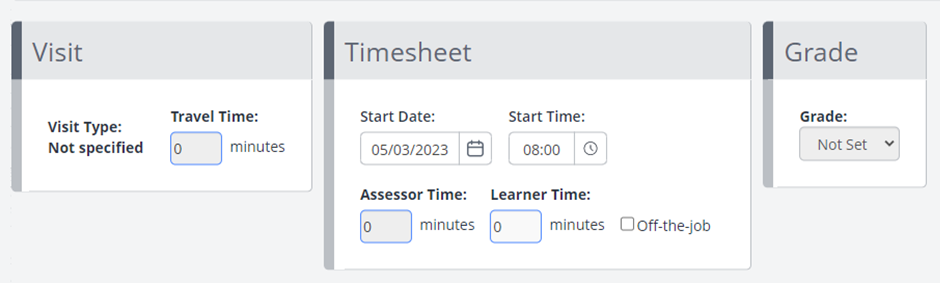
More Information
If the learner does not enter a Start Date:
- The system will automatically use the Assessment Date at the top of the assessment page.
- The time used will be the time the learner signs the assessment.
Tips & Notes
- This feature supports Active Learning requirements by capturing the actual start time of the learning activity.
- Only pending assessments allow start date/time entry—once signed, entries are locked.
- Ensure OTJ criteria are met before selecting the Off-the-Job option.
Terminology
The terminology used in this article may differ depending on your Centre’s configuration.
Related Articles
Need Help?
If you need assistance, please contact Onefile Support or your internal support team.