
Overview
There are two ways to view a learner’s Off‑The‑Job (OTJ) activity within Onefile: via the Timesheet page and directly from the learner’s portfolio. Both views help track when the learner last completed OTJ activity and how many days have passed since then.
Permissions
Who Can Use This Feature?
This information is visible to users who have access to a learner’s portfolio.
Steps
Viewing OTJ Activity in the Timesheet
- The Last OTJ Activity date and time is displayed on the learner’s Timesheet page.
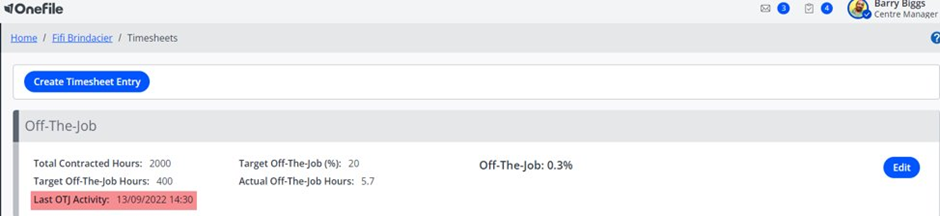
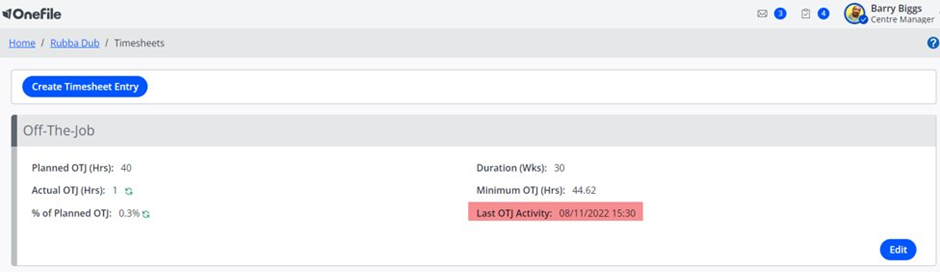
- The date shown represents the moment the most recent OTJ activity ended, not when it began.
- OTJ entries with a date in the future are not included in this calculation.
- The Last OTJ Activity date is displayed for all learners, including those created before and after 1st August 2022.
Viewing OTJ Activity in the Portfolio
- On the learner’s portfolio, the system displays:
- The Last OTJ Activity Date
- The number of days since the last OTJ activity
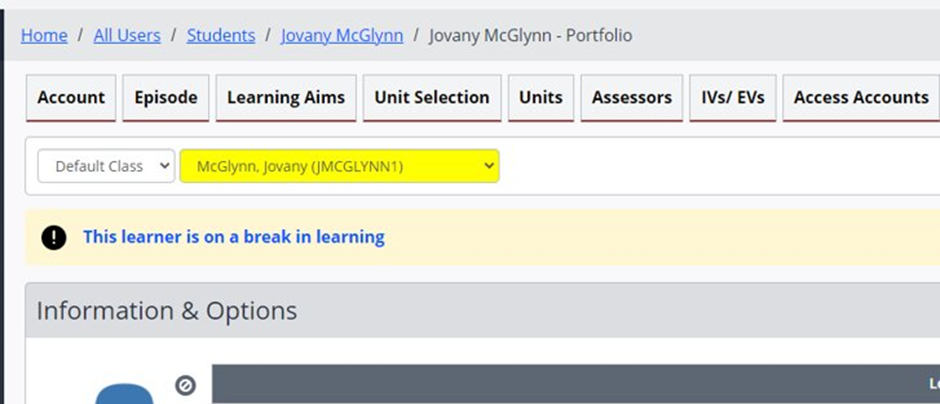
- If the learner is on a Break in Learning, a banner is shown at the top of the portfolio. Clicking this banner takes the user directly to the break‑in‑learning details.
Tips & Notes
- OTJ tracking helps monitor learner engagement and ensure compliance with funding requirements.
- The Active Learning report also includes OTJ metrics for wider visibility.
- Future‑dated OTJ entries are intentionally excluded from “Last OTJ Activity” calculations.
Terminology
Please note that the terminology used in this article may vary depending on your Centre.
Related Articles
Need Help?
If you encounter any issues or have questions, please contact OneFile Support or your internal support channels.