
✨New feature alert
This feature is available from Thursday 19th November 2026.
Overview
The Learners list can be filtered and searched to find the learners you need. You can then download every matching learner as a CSV file, which is useful for reporting or sharing progress outside Enrol Onboarding. You can also find learners who don't have a practical period start date yet.
User Roles
This feature can be used by:
- Admin
- User
Steps to Download the Learners List
- Click Learners from the left-hand navigation menu.
- Apply any filters and search terms you need.
- Click Download.

The CSV file includes every learner matching your current filters and search, across all pages, not just the page you're viewing.
What's in the File
| Field | Description |
|---|---|
| Learner name | The learner's name |
| The learner's email address | |
| Added by | Who added the learner |
| Added on | When the learner was added |
| Programme | The learner's programme |
| Workflow | The learner's workflow |
| Current step | The step the learner is currently on |
| Step status | The status of the current step |
| Assigned user | The user assigned to the learner |
| Progress percentage | How far through onboarding the learner is |
Steps to Find Learners with No Start Date
- Click Learners from the left-hand navigation menu.
- Open the filters and find Practical period start.
- Tick Only show learners with no start date.
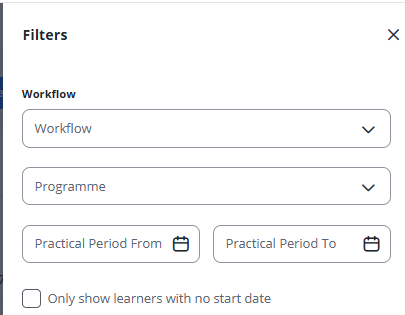
Ticking this box clears and disables the start date range, because the two can't be used together.
Tips & Notes
- The download only includes learners you can already see in Enrol Onboarding.
- Combine the no start date filter with Download to get a list of learners whose start dates still need adding.
Terminology
The terminology used in this article may differ depending on your Centre's configuration.
Related Articles
- View learners within Enrol Onboarding
- Enrol Onboarding report
- Edit a learner within Enrol Onboarding
- Recalculate End Dates from RPL Duration on Enrol Onboarding
Need Help?
If you need assistance, please contact Onefile Support or your internal support team.