
✨New feature alert
This feature is available from Wednesday 25th February 2026.
Overview
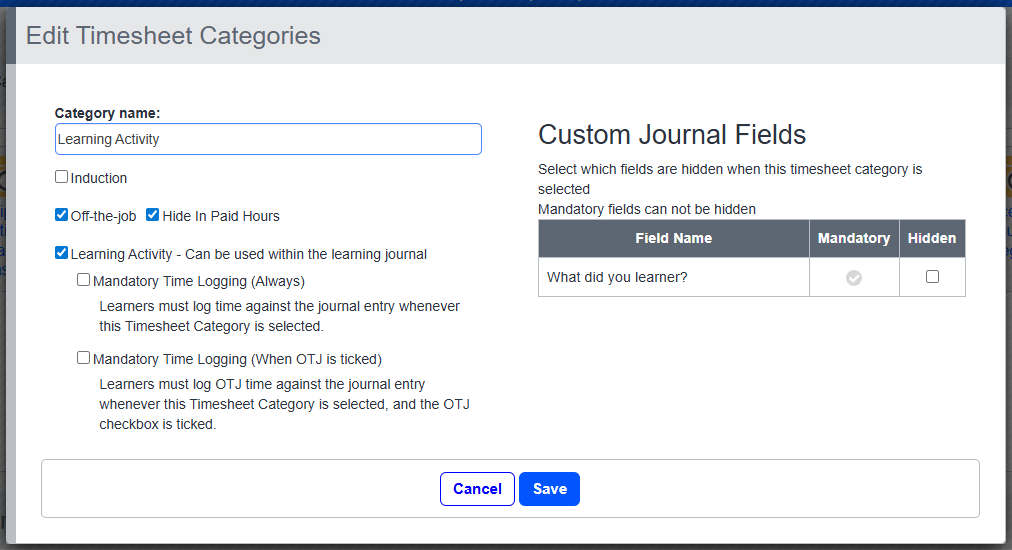
Settings have been introduced for Timesheet Categories, allowing Centres to enforce mandatory time logging when creating or editing Learning Journal entries. These settings ensure that the correct time is captured whenever a specific Timesheet Category is selected.
Permissions
Who Can Use This Feature?
The settings can be configured by:
- Centre Manager
Steps
When creating or editing a Journal Entry, the following behaviour applies based on Timesheet Category settings:
Mandatory Time Logging (Always)
- If this option is enabled for the selected Timesheet Category, the user must record total time against the journal entry before it can be saved.
Mandatory OTJ Time Logging (When OTJ is Tickled)
- If this option is enabled for the selected Timesheet Category, and the OTJ checkbox is ticked on the journal entry, the user must record Off-the-job (OTJ) time before the entry can be saved.
Tips & Notes
- These settings help ensure consistent time recording across all Learning Journal entries.
- Only Timesheet Categories configured with mandatory settings will enforce the time entry requirements.
- Users will not be able to save a journal entry until the relevant time fields are completed.
Terminology
Please note that the terminology used in this article may differ depending on your Centre.
Related Articles
Need Help?
If you need assistance, please contact Onefile Support or your internal support team.