
Overview
Learning Journal entries can be sorted to help users quickly review activity in the order most useful to them. You can sort entries by the Timesheet start date or the Journal entry date.
Who Can Use This Feature?
This feature can be used by:
- All users with access to the learner portfolio
Steps
How to Sort Learning Journal Entries
- Access the learner’s Portfolio.
- Click on Learning Journal.
- Click Filters.
- A pop‑up box will appear showing filter and sorting options.
- In the Sort Bysection, choose either:
- Timesheet start date
- Journal entry date
- Click Apply Filters.
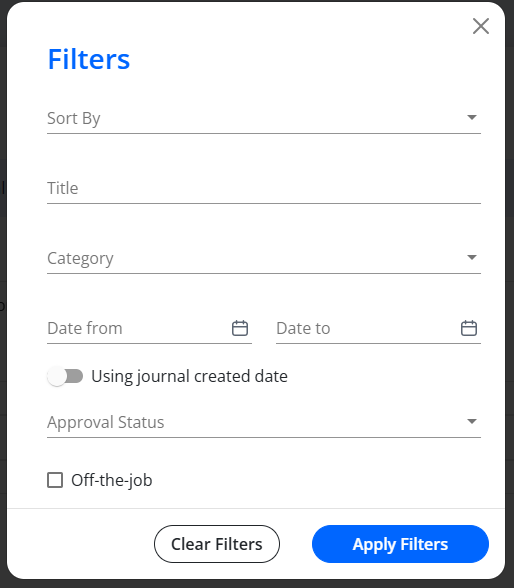
The Learning Journal entries will now display according to your selected sorting preference.
Tips & Notes
- Sorting by Timesheet start date is useful for reviewing chronological activity evidence.
- Sorting by Journal entry date helps track when reflections or feedback were recorded.
- Filters remain applied until they are cleared or adjusted.
Terminology
Please note that the terminology used in this article may differ depending on your Centre.
Related Articles
Need Help?
If you encounter any issues or have questions, please contact Onefile Support or your internal support channels.