
✨New feature alert
This feature is available from Thursday 19th November 2026.
Overview
When an RPL is marked as Unsuccessful or Refer for Support, a reason must now be chosen from a list. This gives your Centre a consistent record of why each outcome was given. Admins set up the reasons in two new lookup lists.
User Roles
This feature can be used by:
- Admin (to set up reasons)
- Admin and User (to choose a reason when marking an RPL outcome)
⚠️ Important: Both lists start empty. Set up your reasons before anyone needs to mark an RPL as Unsuccessful or Refer for Support. Until reasons have been added, users are asked to contact an administrator.
The Two Reason Lists
| Lookup list | Used when an RPL is marked as |
|---|---|
| RPL Unsuccessful Reasons | Unsuccessful |
| RPL Referral for Support Reasons | Refer for Support |
Steps to Add a Reason
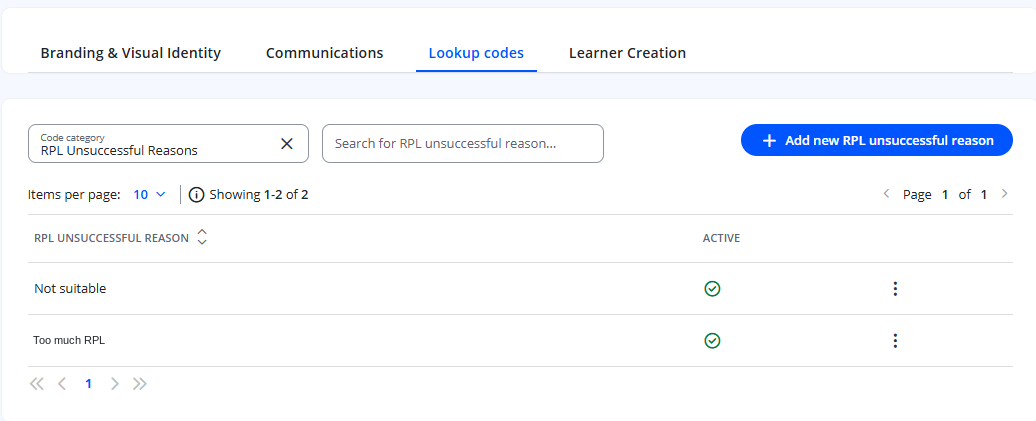
- Click Settings in the navigation menu.
- Click Lookup codes.
- In the code category selector, choose RPL Unsuccessful Reasons or RPL Referral for Support Reasons.
- Click to add a new reason.
- Enter a clear name for the reason.
- Click Save.
Steps to Mark an RPL Outcome with a Reason
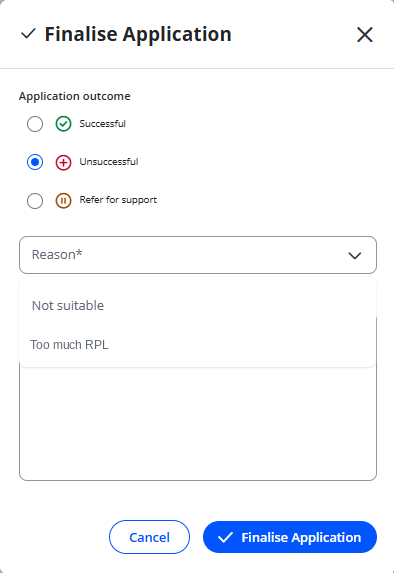
- Open the learner's RPL step.
- Choose Unsuccessful or Refer for Support.
- Choose a reason from the list. This is required.
- Add comments if needed. This is optional.
- Save the outcome.
Tips & Notes
- Make each reason specific enough to be useful in reporting, for example separating "Insufficient prior experience" from "Learner chose not to continue".
- Use the optional comments to record anything specific to the learner.
Terminology
The terminology used in this article may differ depending on your Centre's configuration.
Related Articles
- Add steps into a workflow within Enrol Onboarding
- How RPL Works with Enrol Onboarding
- Add Manual Completion Reasons in Enrol Onboarding
- Enrol Onboarding Withdrawal Reasons
Need Help?
If you need assistance, please contact Onefile Support or your internal support team.