
✨ New feature alert
This feature is available from Thursday, 5th November 2026.
Overview
You no longer need to import learners into Engage by hand. Once you switch on the Create a learner record in Engage event subscription, a learner is created in Engage automatically when their learning aims are saved on their Learning Aims page in Onefile Eportfolio.
You can also choose which learning aims create learners in Engage, so only the learners you want are added.
User Roles
This feature can be used by:
- Centre Manager (to switch on the event subscription and edit learning aims)
How It Works
- A learner is created in Engage when their learning aims are saved on their Learning Aims page in Onefile Eportfolio.
- If the learner's default assessor isn't in Engage yet, the assessor is imported first, and the learner is assigned to them.
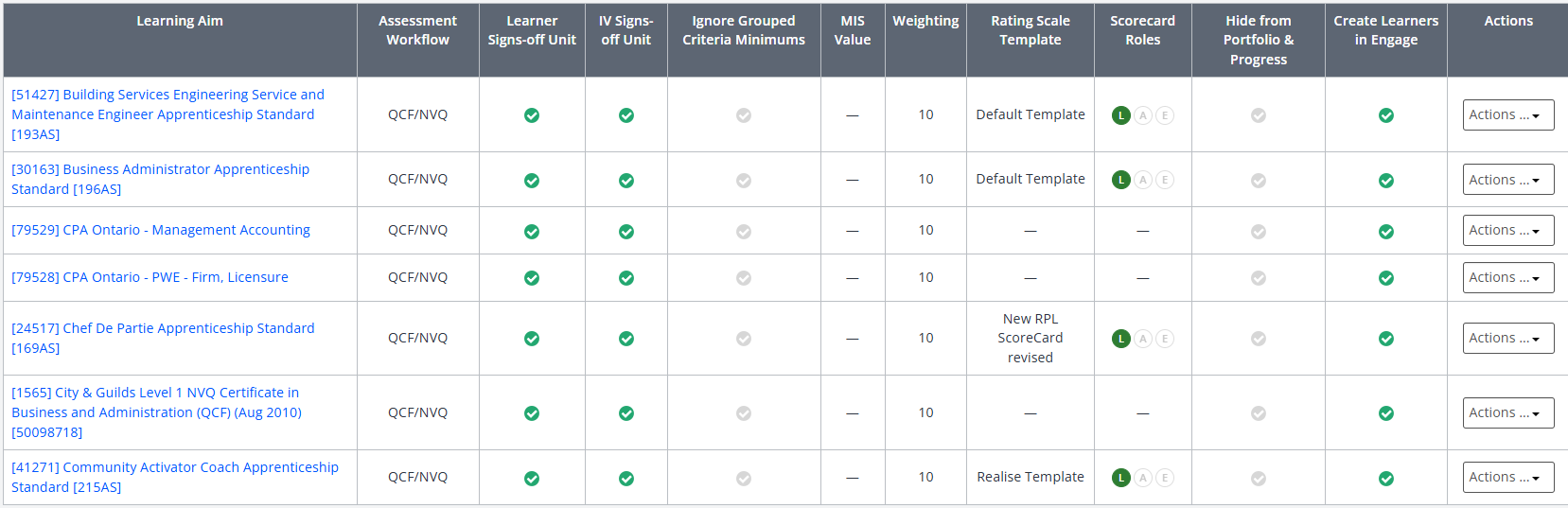
- Only learning aims with Create Learners in Engage ticked create learners in Engage.
Step 1: Choose Which Learning Aims Create Learners in Engage
Each learning aim's Edit pop-up has a Create Learners in Engage checkbox, which is ticked by default.
- In Onefile Eportfolio, open the Edit pop-up for the learning aim.
- Untick Create Learners in Engage if you don't want learners on this aim in Engage.
- Save your changes.
⚠️ Important: The checkbox is ticked by default, so every learning aim will create learners in Engage once the event subscription is on. Untick any aims you want to exclude before switching the subscription on.
Step 2: Switch On the Event Subscription
- In the navigation bar, click Centre.
- Select Integrations.
- Click Go to events.
- Choose Go to Onefile events.
- Switch on Create a learner record in Engage.

Tips & Notes
- If a learner hasn't appeared in Engage, check that the event subscription is on, the learning aim has Create Learners in Engage ticked, and the learner's learning aims have been saved.
- You can still import learners manually. The import list leaves out learners on excluded aims and learners who have already been imported.
- If you manage multiple Eportfolio centres, changes to Event Subscriptions in one centre apply to all associated centres.
Terminology
The terminology used in this article may differ depending on your Centre's configuration.
Related Articles
- How to import learners into Engage
- Enable Event Subscriptions
- Event Subscriptions – Create Learner Record
- What information is pulled through from Eportfolio to Engage?
Need Help?
If you need assistance, please contact Onefile Support or your internal support team.