
✨Improved feature alert
This update is available from Wednesday 25th February 2026.
Overview
Journal Approvals allow Centres to require provider approval for Learning Journal entries. This ensures that entries are reviewed by an assessor before being accepted. Centre Managers can configure approval rules, hour thresholds, and task notifications.
Permissions
Who Can Use This Feature?
This feature can be enabled and configured by:
- Centre Manager
Steps
Enable Journal Approvals
- Click Centre on the left-hand navigation bar.
- Click Settings.
- Scroll down to the Miscellaneous section.
- Locate Journal Approvals.
- Tick Learning journal entries require provider approval.
Configure Approval Conditions
Set your approval conditions based on total time, off‑the‑job time, and date requirements:
- When Total Time is over:0.00 hours
This means approval is required for all entries, regardless of the time recorded. - When OTJ Time is over:0.00 hours
This means approval is required regardless of off‑the‑job time recorded. - You can customise these thresholds. For example: Require approval only for OTJ entries over 4 hours.
- For journals created on or after:03/09/2025
Only entries created from this date onwards will require approval. You can update this date if needed. - Any entry is created or edited (new setting)
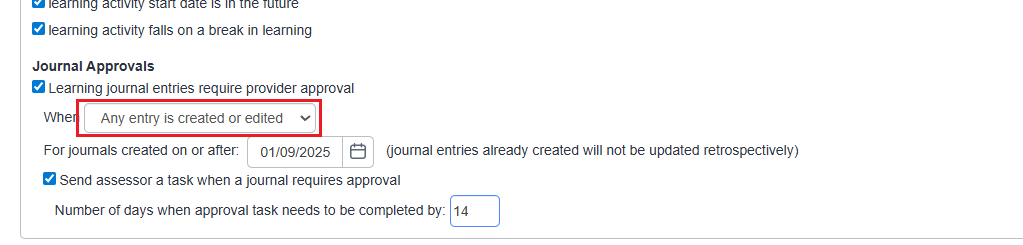
Send Assessor a Task
We recommend enabling Send assessor a task when a journal requires approval. This ensures assessors receive a task to approve or reject the entry.
You can also set the task deadline between 0 and 99 days, depending on your Centre’s workflow.
Tips & Notes
- Setting thresholds allows Centres to control which entries truly need approval.
- Approval workflows help ensure entries are checked before contributing to learner progress.
- Tasks help assessors keep on top of required approvals.
Terminology
Please note that the terminology used in this article may differ depending on your Centre.
Need Help?
If you need assistance, please contact Onefile Support or your internal support team.