
Overview
The Data Bridge audit log is a full history of what was created and changed in your Data Bridge configuration — for example, when a source system, mapping, transformation rule, or agent was created or updated. It's useful for tracking changes and for audit purposes.
User Roles
This feature can be used by:
- Centre Manager
Steps to View the Audit Log
- Go to Data Bridge › Audit Log.
- (Optional) Filter by Entity type or Action to narrow the list.
- Adjust Items per page if you need to see more entries at once.
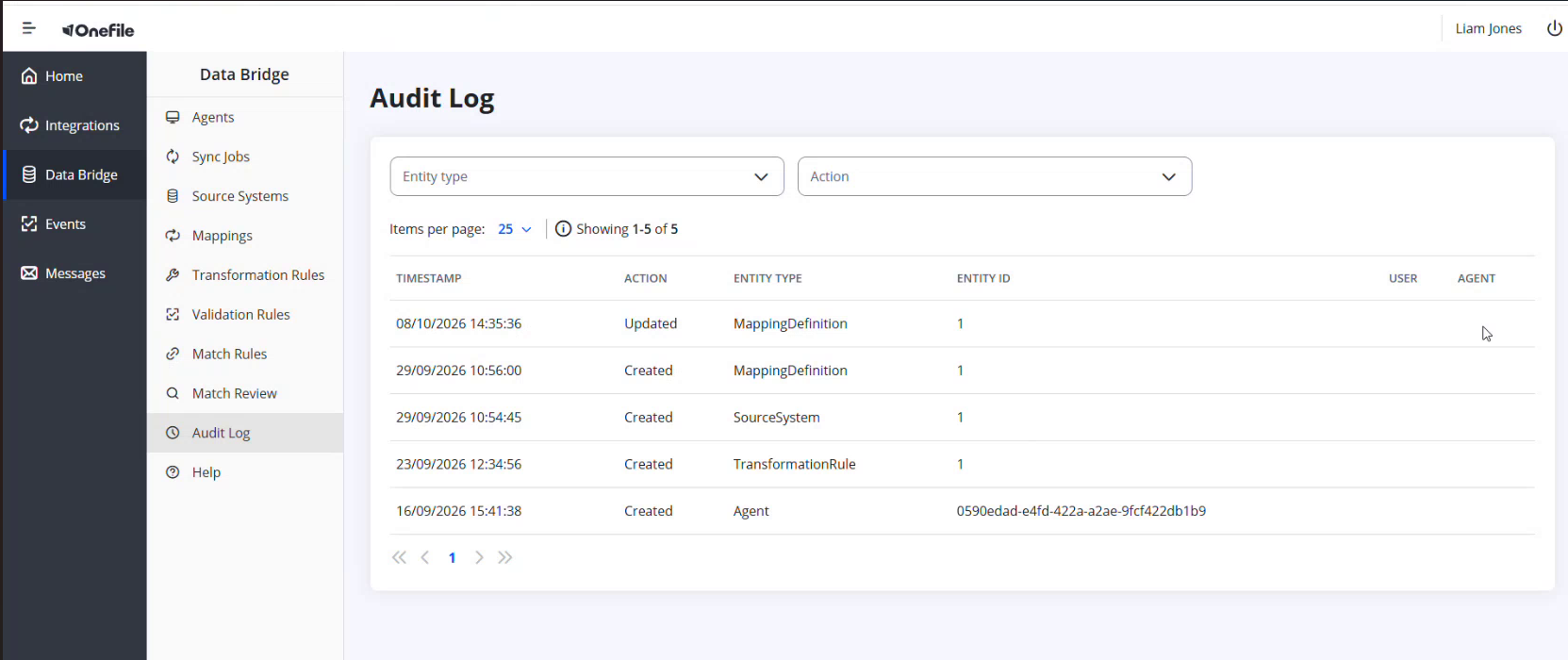
What the Log Shows
| Column | Description |
|---|---|
| Timestamp | When the change happened. |
| Action | What happened (for example, Created or Updated). |
| Entity Type | What was changed (for example, MappingDefinition, SourceSystem, TransformationRule, Agent). |
| Entity ID | The identifier of the item that changed. |
| User | The user who made the change, where applicable. |
| Agent | The agent involved, where applicable. |
Tips & Notes
- Filter by Entity type when you're tracking changes to one part of your configuration, such as mappings.
Terminology
The terminology used in this article may differ depending on your Centre's configuration.
Related Articles
- What Is Data Bridge in Onefile?
- Setting Up Match Rules and Reviewing Matches in Data Bridge
- Creating a Field Mapping in Data Bridge
Need Help?
If you need assistance, please contact Onefile Support or your internal support team.