
Overview
Centre Managers can enable Off-The-Job (OTJ) tracking to compare a learner's actual Off-The-Job hours against the expected hours to date. This gives clearer visibility of learner progress and supports compliance with funding requirements.
User Roles
This feature can be used by:
- Centre Manager
Centre Setting
To use this feature, the following Centre Setting must be switched on:
- Calculate Expected OTJ to date
Steps to Enable Expected OTJ Tracking
- Click Centre on the left-hand navigation bar.
- Click Settings.
- Scroll down to the Miscellaneous section.
- Under Timesheets, tick Calculate Expected OTJ to date.
- Set your thresholds for comparison.
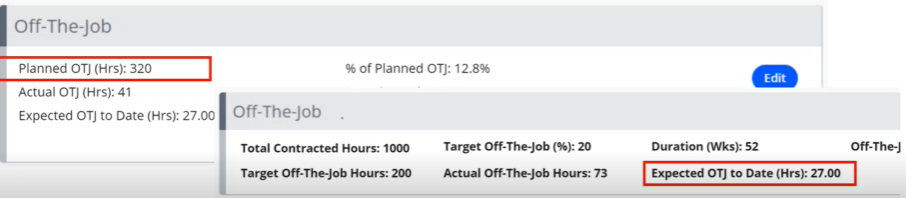
How Expected OTJ Is Calculated
The formula depends on the learner's start date:
| Learner start date | Expected OTJ to date |
|---|---|
| Before 01/08/2022 | (Weeks to date ÷ Duration in weeks) × Target OTJ |
| On or after 01/08/2022 | (Weeks to date ÷ Duration in weeks) × Planned OTJ |
You can also report on expected OTJ using the Learners Expected OTJ Progress report.
Expected OTJ to Date and Break in Learning (BIL)
When a learner has a Break in Learning (BIL), the Expected OTJ to date calculation is adjusted to account for the time spent on the break, as the learner wouldn't have been able to complete OTJ hours during that period. As a result, the number of weeks spent on a BIL is subtracted from the calculation.
Calculation Rules
The formula used depends on the learner's start date:
| Learner start date | Expected OTJ to date (with BIL) |
|---|---|
| On or after 1 August 2022 | Planned OTJ Hours × ((Weeks to date − Weeks on BIL to date) ÷ Duration in weeks) |
| Before 1 August 2022 | Target OTJ Hours × ((Weeks to date − Weeks on BIL to date) ÷ Duration in weeks) |
Definitions
| Term | Meaning |
|---|---|
| Weeks to date | The total number of weeks from the programme start date to the current date. |
| Weeks on BIL to date | The total number of weeks the learner has spent on a Break in Learning up to the current date. This includes multiple BIL periods, as well as any current BIL. |
| Duration (weeks) | The original programme duration in weeks. This doesn't change when a BIL is applied; instead, the expected completion date is updated. |
⚠️ Important: If the learner also has an EPA Start Date, it is factored into the full calculation:
Expected OTJ = Planned OTJ × ((MIN(Weeks to date, Weeks to EPA Start Date) − Weeks on BIL to date) ÷ Duration in weeks)
Terminology
The terminology used in this article may differ depending on your Centre's configuration.
Related Articles
Need Help?
If you need assistance, please contact Onefile Support or your internal support team.