
✨ Updated feature alert
This feature update is available from Wednesday 28 October 2026.
Overview
Your Learner Support page is a simple view of the support recorded for you.
What's Changed?
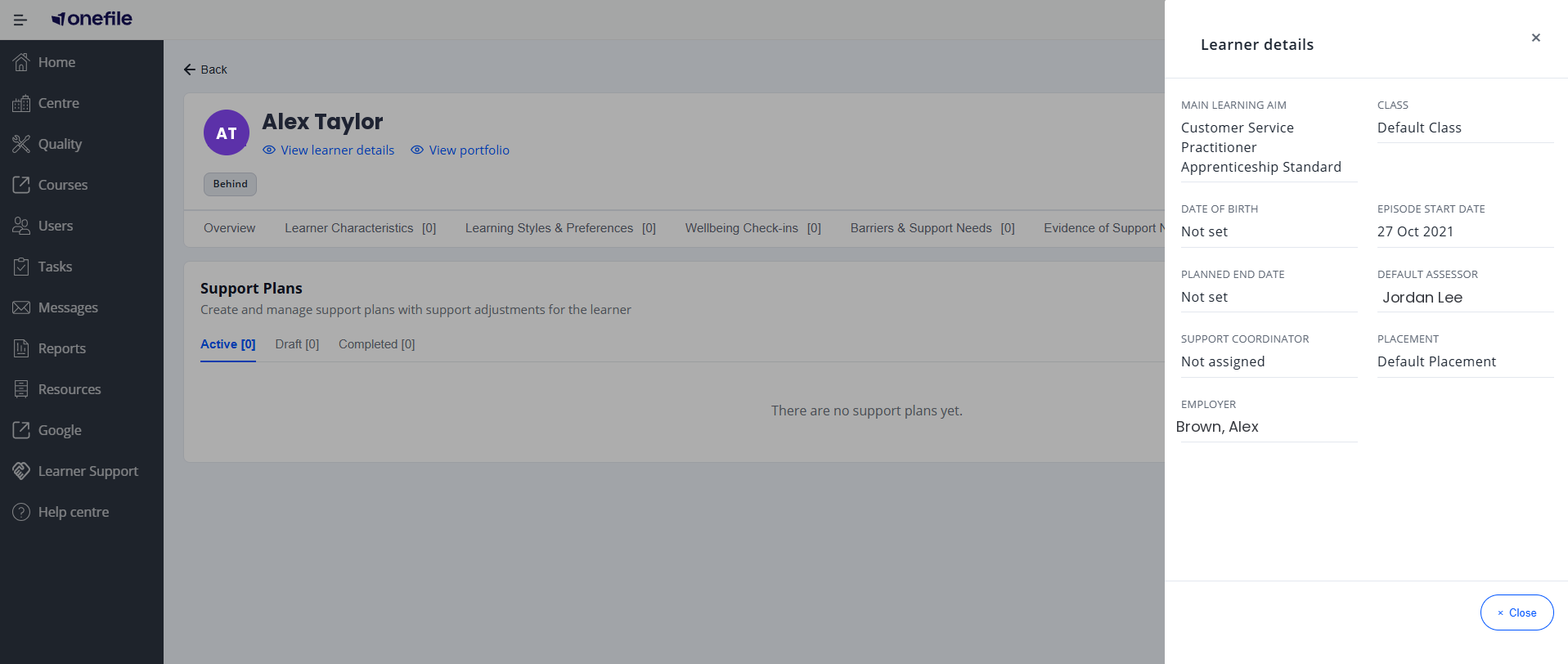
The Learner details panel now shows the learner's date of birth, with their age in brackets (for example, 15 Feb 2004 (21)), so you don't need to go back to Eportfolio to check a learner's age when agreeing support. The date of birth comes from the learner's Eportfolio record and can't be edited here, and the age is recalculated each time the panel is opened. If no date of birth is held, the field shows Not set.
Quick Summary
- A wellbeing banner shows when your next check-in is due.
- A summary shows your adjustments and learning styles.
- Tiles give quick counts of your support records.
- At the top, a Wellbeing Check-in banner shows when your next check-in is due and when you last completed one, with a Complete a check-in button.
- Below that, a summary shows any active adjustments and your recorded learning styles.
- A set of tiles gives you a quick count of your Wellbeing Check-ins, Barriers to Learning, Support Needs, Support Plans and Additional Support.
You'll only see the sections your centre has made visible to you.
Tips & Notes
- If something you'd expect to see isn't there, your tutor or centre team can help.
Terminology
The terminology used in this article may differ depending on your Centre's configuration.
Related Articles
Need Help?
If you need help, please speak to your tutor or your centre's support team.