
Overview
When you select Learner Support from the left-hand navigation — before you've chosen a learner — you land on the module home page. This staff-only page (learners never see it) is organised into tabs, and everything on it is scoped to the learners you have access to.
Quick Summary
- Tabs: Overview, Learners, Wellbeing Check-ins, Additional Support Events, Centre Analytics, Wellbeing Templates and Settings.
- The Overview tab gives clickable count tiles.
- The Learners tab is a searchable, filterable list.
Overview tab
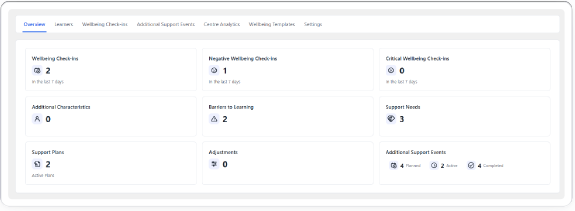
A fixed grid of count tiles, each a clickable shortcut. There are no charts here — detailed reporting lives on Centre Analytics.
- Additional Characteristics, Barriers to Learning, Support Needs, Support Plans and Adjustments each count the accessible learners who have that item, and open the Learners tab filtered to that group.
- Wellbeing Check-ins, Negative and Critical Wellbeing Check-ins count check-ins completed in the last 7 days.
- Additional Support Events shows three clickable sub-counts — Planned, Active and Completed.
Learners tab
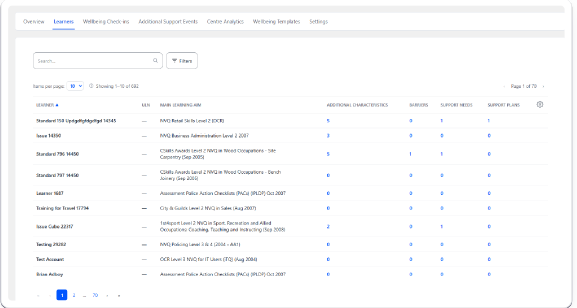
- Search by learner name.
- Filter by Main Learning Aim, Report Group, Class, Learner Status, Placement, Default Assessor and Archived Status, plus by additional characteristics, active adjustments, active support plans or planned/in-progress events.
- Click a learner's name to open their Support Profile.
Wellbeing Check-ins tab
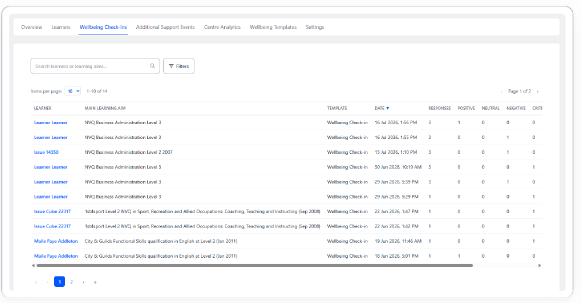
A centre-wide list of wellbeing check-ins across your accessible learners, for oversight and early risk identification. Filter by severity, date range and template; selecting a row opens that learner's Support Profile at the relevant check-in.
Tips & Notes
- Use the cog icon on the Learners grid to show or hide columns — your choices are remembered next time.
- A count tile only appears if you have access to what it's counting; a visible zero is a genuine zero.
Terminology
The terminology used in this article may differ depending on your Centre's configuration.
Related Articles
- What is the Inclusion Module?
- Opening a learner's Support Profile
- Monitoring your centre with Centre Analytics
Need Help?
If you need assistance, please contact Onefile Support or your internal support team.