
✨ Updated feature alert
This feature update is available from Wednesday 28 October 2026.
Overview
Support plans formally document a learner's adjustments, sessions and goals, and carry a sign-off process before they take effect.
What's Changed?
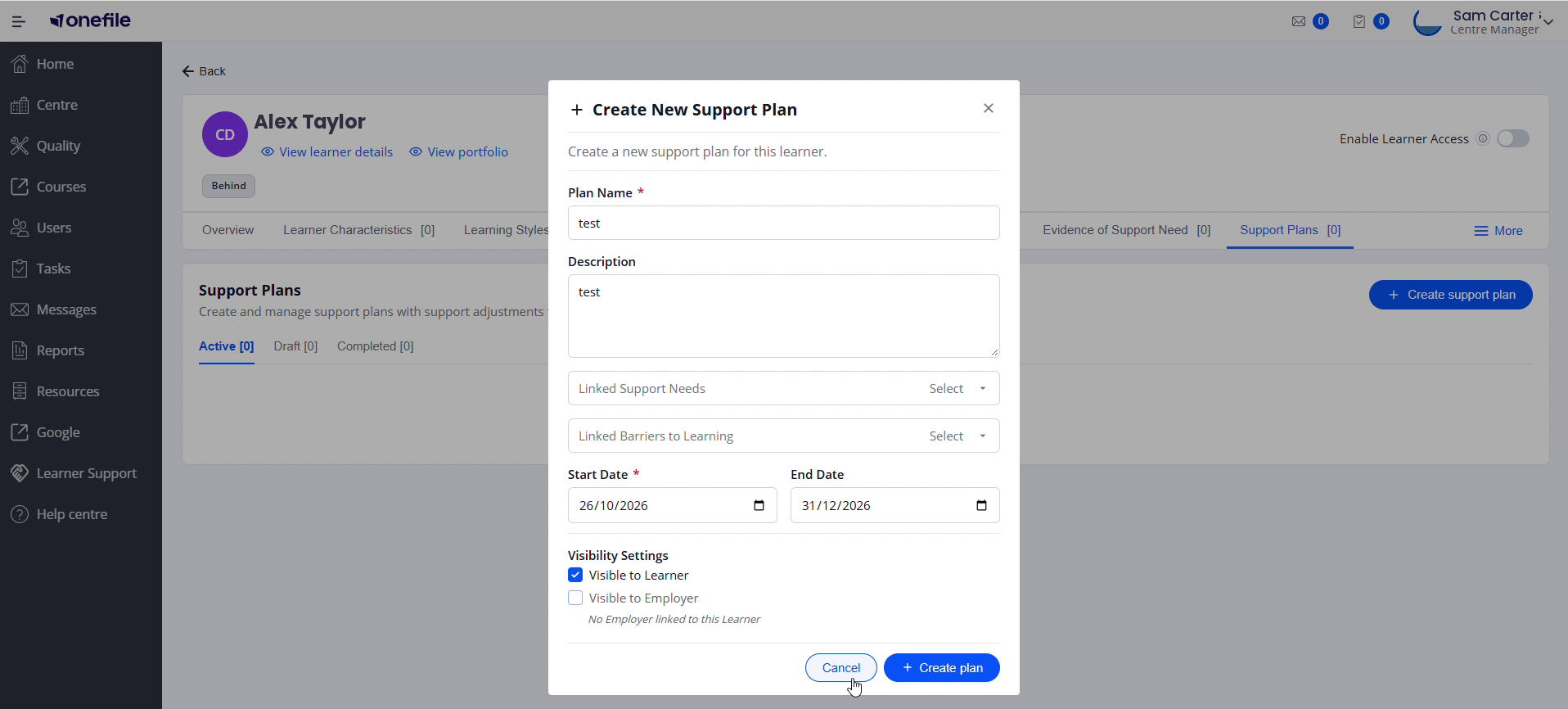
When you create a support plan, the visibility settings now default to Visible to Learner: On and Visible to Employer: Off, so sharing with an employer is a deliberate choice. Tick Visible to Employer before saving to share it. An employer signature is only requested when a plan is visible to the employer and Employer is a configured signatory, so a plan won't ask for an employer signature unless you share it. Existing plans are not changed.
Quick Summary
- Create a plan and link existing barriers and support needs.
- Add adjustments, additional support and goals.
- Plans move Draft → Active → Completed with sign-off.
Creating a plan
- Select Create support plan and complete Plan Name (required), Description, Start Date (required) and an optional End Date.
- Link one or more existing Support Needs and/or Barriers to Learning (only records that are currently valid can be linked).
- Set Visibility — Visible to Learner and Visible to Employer (both on by default).
⚠️ If a linked barrier or support need is hidden from a party, the plan's visibility toggle for that party is automatically locked off until the hidden record is unlinked, ends, or is made visible.
Adding content to a plan
- Support Adjustments: a description, the person responsible and a start date (end date optional).
- Additional Support: the same fields, plus an optional Recurring checkbox and frequency.
- Goals & Targets: a Goal Title (required), description, target date, status and a progress slider. Reaching 100% sets the status to Complete.
Sign-off and status
- A plan starts as Draft. It becomes Active once every required signatory has signed — or, if none are required, once you select Active.
- Your centre configures which roles must sign. A Learner or Employer signature is only required if the plan is visible to that party.
- Use Send declaration to generate a signing task for each applicable signatory in one action; a Support Coordinator editing the plan can sign inline.
Tips & Notes
- ⚠️ Editing a plan reverts it to Draft and clears signatures — except changes to the End Date or to Goals & Targets, which don't affect status.
- A plan automatically moves to Completed once its End Date is reached, regardless of signature state.
Terminology
The terminology used in this article may differ depending on your Centre's configuration.
Related Articles
- Recording barriers to learning and support needs
- Choosing who signs a support plan
- Recording additional support events
Need Help?
If you need assistance, please contact Onefile Support or your internal support team.